
PHPHR Documentation
Setup & Features Documentation
PHPHR Documentation provides comprehensive installation, setup, and configuration guidance for PHPHR, including detailed step-by-step instructions, system requirements, and video tutorials to ensure a smooth and efficient onboarding experience.
After completing your PHPHR Cloud purchase, you will receive an email from our team with your HR software access link (URL). You can also view and copy this URL anytime from the My Account → Login Access tab. PHPHR runs on a secure private server to ensure complete data privacy and control.
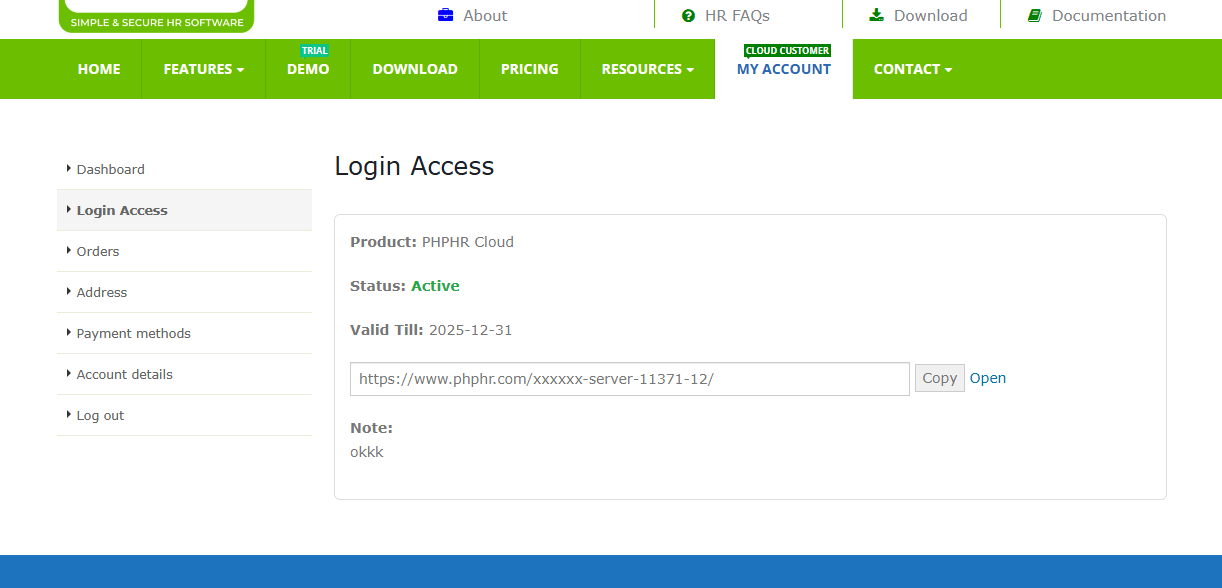
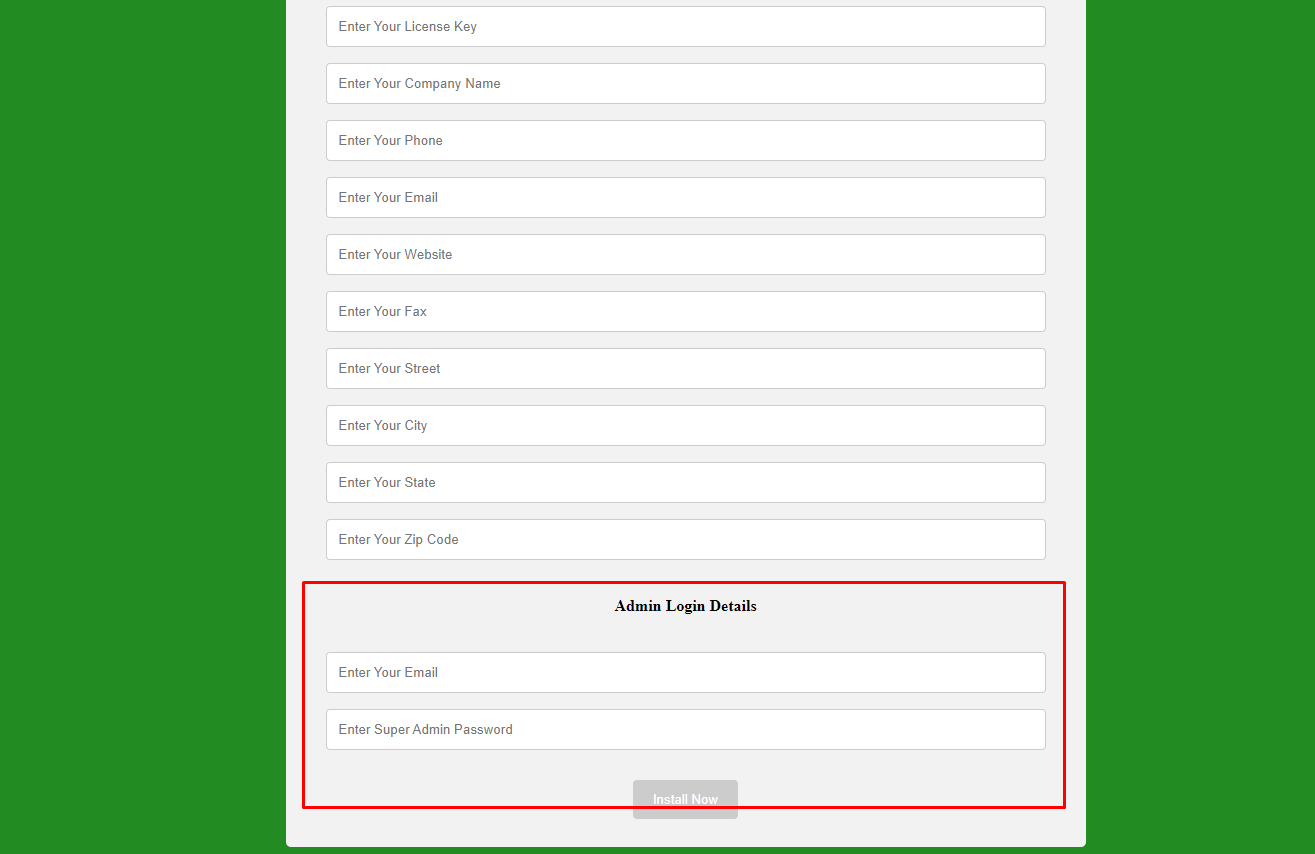
When you click the link, you will be redirected to the setup form where you can enter your company details and set your PHPHR admin login username and password. Please make sure to fill in your company information accurately and store your admin username and password securely, as you will use them for all future logins. Once the form is completed, simply click the “Install Now” button to finish the setup.
PHPHR Configuration
PHPHR Configuration involves setting up and customizing your PHPHR software to align with your organization’s specific needs. This process includes configuring 🔧 system settings, email notifications, user roles & access permissions, and template customization. Additionally, it enhances workflow efficiency, ensuring a seamless and user-friendly HR management experience.
Editing the Front Page
Customizing the Front Page of your PHPHR application lets you personalize the user experience, aligning it with your organization’s branding and specific needs. This includes modifying ️ layouts, color schemes, ️ logos, and content, ensuring a professional and engaging interface for users.
SMTP Email & Template Setup
Setting up SMTP (Simple Mail Transfer Protocol) ensures smooth email delivery from your PHPHR system. Follow these steps to configure it:
Access Email Configuration – Navigate to the settings or configuration section in your PHPHR application.
Enter SMTP Server Details
SMTP Host – e.g., smtp.your-email-provider.com
SMTP Port – 587 for TLS, 465 for SSL
SMTP Username – Usually your email address
SMTP Password – Your SMTP account password
Choose Encryption – Select TLS or SSL to secure email transmissions.
With proper SMTP configuration, your PHPHR system can send reliable and secure emails effortlessly.
Employee Management System
PHPHR enables you to store and organize detailed employee profiles efficiently. This feature includes maintaining personal information, employment history, contact details, and other essential data. With an intuitive interface, managing employee records becomes seamless, allowing for quick access and effortless updates whenever needed.
Attendance Management System
PHPHR offers comprehensive attendance tracking to ensure accurate employee monitoring. Features include real-time tracking, ️ biometric integration, and automated reports on working hours and absences. This system helps maintain precise records and streamline attendance management efficiently.
️Leave Management System
Leave Management System in PHPHR simplifies leave requests and approvals, ensuring a smooth process for employees and administrators. It features customizable leave policies, real-time leave balance tracking, and automated approval workflows. This system enhances efficiency, making leave management seamless and hassle-free.
Payroll Management System
The PHPHR Payroll Management System automates payroll processing, ensuring accurate salary calculations, tax compliance, and deduction management. It features payslip generation, payment management, and tax regulation integration, streamlining payroll operations for efficiency and reliability.
Loan Management System
The Loan Management System in PHPHR simplifies the entire process of managing employee loans. It tracks loan applications, monitors repayments, and manages schedules, offering an efficient way to handle loan deductions and keep accurate financial records.
Document Management System
The Document Management System in PHPHR ensures secure storage and organization of all employee documents. From contracts to ID proofs, the system provides easy access and efficient management, while ensuring data security and compliance.
Shift Management System
The Shift Management System in PHPHR streamlines the process of organizing and managing employee shifts. It allows for shift creation, assignment, and tracking, ensuring efficient scheduling and easy management of work hours.
Grievance Management System
The Grievance Management System in PHPHR offers a structured approach to handling employee grievances. It records complaints, tracks resolutions, and ensures transparency in the process, enabling effective addressing and resolution of issues.
Recruitment Management System
The Recruitment Management System in PHPHR streamlines the hiring process by managing job postings, applications, and candidate tracking. It enhances efficiency and ensures a well-organized recruitment workflow.
Employee Self-Service (ESS) System
The Employee Self-Service System in PHPHR empowers employees to manage their profiles, track attendance, and ️ submit leave requests independently. It provides easy access to personal information while reducing administrative workload, enhancing efficiency and convenience.
Expense Management System
The Expense Management System in PHPHR simplifies expense tracking and approval, ensuring seamless reimbursement through payroll integration. It also provides comprehensive expense reporting, making financial management more efficient.
Asset Management System
The Asset Management System in PHPHR helps track assets assigned to employees, such as laptops and vehicles. It manages asset assignment, usage tracking, and returns, ensuring accountability and efficient asset management.
Task or Work Management System
The Task Management System in PHPHR enables businesses to assign, track, and manage tasks efficiently. Managers can delegate responsibilities, set deadlines, and monitor progress in real-time, ensuring transparency and workflow efficiency.
User Role Management System
The User Role Management System in PHPHR enables businesses to define and manage user roles and permissions. It ensures appropriate access control based on roles, enhancing security and operational efficiency.
PHPHR is a comprehensive HR management system designed to streamline and automate various HR processes, enhancing efficiency and productivity. From document management and attendance tracking to payroll processing and task management, PHPHR provides powerful tools for businesses to manage their workforce effectively. With its intuitive interface, secure access controls, and seamless automation, PHPHR simplifies HR operations, reducing administrative workload and ensuring compliance with organizational policies. Whether it’s managing employee records, handling grievances, or tracking expenses, PHPHR offers a scalable solution to meet diverse business needs.
By leveraging PHPHR, organizations can enhance employee engagement, optimize HR workflows, and improve overall workplace efficiency.
FAQs
How do I start the PHPHR setup after purchase?
After completing your PHPHR Cloud purchase, you will receive an email from our team containing your HR software access link (URL). This URL is unique to your organization and provides secure access to your PHPHR instance. You can also view and copy this link anytime from the My Account → Login Access tab. When you click the link, you will be redirected to the setup page where you can complete the installation process and begin configuring your HR system.
Is PHPHR hosted on a cloud or private server?
PHPHR is hosted on a secure private server, not a shared public environment. Each organization gets isolated access, ensuring complete data privacy, better system performance, and higher reliability. This private server architecture gives businesses full control over sensitive HR data and is ideal for organizations that prioritize confidentiality and compliance.
What details are required during initial setup?
During the initial setup, you are required to enter your company details such as organization name and basic information. You will also create an admin login username and password. These admin credentials are critical, as they are used to access the system, manage settings, and control user permissions. It is strongly recommended to store these credentials securely for future use.
Can PHPHR be customized according to company needs?
Yes. PHPHR offers extensive configuration options to match your organization’s HR policies and workflows. You can customize system settings, email notifications, user roles, access permissions, templates, and approval workflows. This flexibility ensures PHPHR adapts to your business processes rather than forcing you to change how your HR operations work.
Does PHPHR support email notifications?
Yes. PHPHR supports SMTP email configuration, enabling the system to send automated emails for approvals, alerts, notifications, and system updates. With proper SMTP setup, all emails are delivered securely and reliably, ensuring smooth communication between employees, managers, and administrators.
What is included in the Employee Management System?
The Employee Management System allows you to store and manage complete employee profiles in one centralized location. This includes personal details, employment history, contact information, official records, and related documents. The system makes it easy to search, update, and maintain employee data, reducing manual work and improving data accuracy.
How does the Attendance Management System work?
PHPHR provides a comprehensive Attendance Management System that supports real-time tracking, biometric integration, and automated attendance reports. It accurately records working hours, absences, and attendance patterns, helping organizations maintain precise records and seamlessly integrate attendance data with payroll processing.
Can leave requests and approvals be automated?
Yes. The Leave Management System automates the entire leave workflow. Employees can apply for leave online, while managers and administrators can approve or reject requests through defined approval flows. The system also tracks leave balances in real time and supports customizable leave policies, ensuring transparency and consistency.
Does PHPHR handle payroll processing?
Yes. PHPHR Payroll Management automates salary calculations, deductions, tax compliance, and payslip generation. It ensures accurate payroll processing, reduces calculation errors, and helps organizations process salaries on time while maintaining compliance with payroll policies.
How does the Employee Self-Service (ESS) system help employees?
The Employee Self-Service system empowers employees to manage their own profiles, check attendance, apply for leave, access documents, and track requests without HR intervention. This improves transparency, reduces administrative workload, and allows HR teams to focus on more strategic tasks.
Is data security maintained across all modules?
Yes. PHPHR maintains high security standards across all modules using role-based access controls, secure authentication, and private server hosting. Users can only access features and data relevant to their role, ensuring sensitive employee and organizational information remains protected at all times.
What should I do if a feature or issue is not covered in the documentation?
If you face any issue or have a question that is not covered in the documentation, you can send us an email. Our support team will assist you promptly and use your feedback to continuously improve and expand the documentation for better user experience.
Can multiple branches or locations be managed in PHPHR?
Yes. PHPHR supports multi-branch and multi-location management, allowing organizations to manage employees, attendance, payroll, and policies separately for each branch while maintaining centralized control. This is especially useful for businesses operating across multiple offices or regions.
Does PHPHR support role-based access control?
Yes. PHPHR includes a powerful user role management system that allows administrators to define roles and assign permissions based on responsibilities. This ensures users can only access relevant data and features, improving security and operational efficiency.
Can PHPHR generate reports for HR analysis?
Yes. PHPHR provides built-in reporting capabilities that help organizations analyze attendance, payroll, leave usage, and employee data. These reports support better decision-making, compliance tracking, and performance monitoring.
Is PHPHR suitable for remote or hybrid work environments?
Yes. PHPHR is well-suited for remote and hybrid teams, allowing employees and managers to access the system securely from anywhere. Features like ESS, attendance tracking, leave management, and task management support flexible work models.
Can employees access PHPHR from mobile devices?
PHPHR is accessible through modern web browsers on mobile devices, allowing employees to use ESS features such as leave requests, attendance viewing, and profile updates conveniently from their smartphones or tablets.
How does PHPHR help with compliance and record keeping?
PHPHR maintains accurate employee records, attendance logs, payroll data, and document storage, helping organizations stay compliant with internal policies and audit requirements. Centralized data storage also simplifies record retrieval when needed.
Does PHPHR support grievance handling?
Yes. PHPHR includes a Grievance Management System that allows employees to raise concerns and complaints in a structured manner. HR teams can track issues, manage resolutions, and ensure transparency throughout the grievance process.
Can PHPHR manage employee expenses and reimbursements?
Yes. The Expense Management System in PHPHR enables employees to submit expense claims while managers can review and approve them. Approved expenses can be integrated with payroll for seamless reimbursement.
Does PHPHR include asset tracking?
Yes. PHPHR’s Asset Management System tracks assets assigned to employees, such as laptops or other equipment. It records asset allocation, usage, and returns, helping organizations maintain accountability and control.
Can PHPHR be used for task and work tracking?
Yes. PHPHR includes a Task or Work Management System that helps managers assign tasks, set deadlines, and track progress. This improves transparency, accountability, and team productivity.
How does PHPHR support recruitment and hiring?
PHPHR’s Recruitment Management System helps manage job postings, candidate applications, and hiring stages in a centralized workflow. This simplifies recruitment tracking and improves hiring efficiency.
Can PHPHR be used for internal audits and reviews?
Yes. With structured data, reports, and document management, PHPHR supports internal audits and HR reviews. Administrators can easily access historical records and reports when required.
Is training required to use PHPHR effectively?
No extensive training is required. PHPHR is designed with an intuitive interface and is supported by detailed documentation. Most users can quickly learn and use the system with minimal guidance.
How can I get help if I face technical issues?
If you experience any technical issue or face challenges while using PHPHR, you can contact our support team via email. Our team will assist you and ensure smooth operation of your HR system.
Can PHPHR manage multiple departments within an organization?
Yes. PHPHR allows you to create and manage multiple departments within a single organization. Each department can have its own employees, reporting structure, and access permissions, making it easier to manage large or complex organizational structures.
Does PHPHR support approval workflows?
Yes. PHPHR supports configurable approval workflows for leave requests, expenses, tasks, and other HR actions. Organizations can define approval hierarchies to ensure proper authorization and accountability at every step.
Can historical employee data be stored in PHPHR?
Yes. PHPHR allows you to store and maintain complete historical employee records, including past roles, salary changes, attendance history, and documents. This ensures long-term record keeping and easy access for audits or reviews.
How does PHPHR help reduce HR manual work?
PHPHR automates repetitive HR tasks such as attendance tracking, payroll calculations, leave approvals, notifications, and reporting. This significantly reduces manual data entry, minimizes errors, and saves time for HR teams.
Is PHPHR suitable for growing organizations?
Yes. PHPHR is highly scalable and can grow with your organization. As your workforce expands, you can easily add more employees, departments, roles, and modules without changing systems.
Can administrators control what employees see in the system?
Yes. Using role-based access control, administrators can define exactly what information and features each user role can access. This ensures sensitive data is only visible to authorized users.
Does PHPHR support document uploads for employees?
Yes. PHPHR allows employees and administrators to upload, store, and manage documents such as contracts, certificates, ID proofs, and policies. Documents are stored securely and can be accessed based on permissions.
Can PHPHR generate payslips automatically?
Yes. PHPHR automatically generates payslips after payroll processing. Payslips can include salary components, deductions, and net pay, ensuring transparency and accuracy for employees.
How does PHPHR help improve employee transparency?
Through features like Employee Self-Service, attendance visibility, leave balance tracking, and document access, PHPHR promotes transparency and builds trust between employees and HR teams.
Can PHPHR track employee work assignments?
Yes. PHPHR’s Task or Work Management System allows managers to assign work, track progress, and monitor completion status. This helps improve accountability and productivity.
Is PHPHR useful for HR audits?
Yes. PHPHR maintains structured and centralized HR data, making it easy to retrieve records, reports, and documents during internal or external audits.
Does PHPHR support organization-wide announcements?
PHPHR can be used to communicate important updates and notifications through system alerts and emails, ensuring employees stay informed about HR-related information.
Can PHPHR integrate attendance data with payroll?
Yes. Attendance data in PHPHR can be seamlessly linked with payroll processing to ensure accurate salary calculations based on working days, absences, and leave records.
Is PHPHR easy to use for non-technical users?
Yes. PHPHR is designed with an intuitive and user-friendly interface. HR professionals and employees can use the system easily without requiring technical expertise.
How does PHPHR support long-term HR planning?
By maintaining accurate employee records, reports, and historical data, PHPHR helps organizations analyze trends, plan workforce needs, and make informed HR decisions.
What happens if an employee leaves the organization?
PHPHR allows administrators to manage employee exit processes while retaining historical data for compliance and reporting. Access can be revoked while records remain securely stored.
Can PHPHR be used across different industries?
Yes. PHPHR is flexible and industry-agnostic, making it suitable for IT companies, manufacturing firms, service providers, startups, and enterprises across various sectors.
Does PHPHR help improve overall HR efficiency?
Yes. By automating HR workflows, centralizing data, and reducing paperwork, PHPHR improves operational efficiency and allows HR teams to focus on strategic initiatives.
Is customer support available if I face issues?
Yes. If you face any issue or have questions not covered in the documentation, you can send us an email. Our support team will assist you and continuously improve the system and documentation.
PHPHR Documentation is designed to help you easily understand, set up, and use PHPHR for your HR operations. It covers all major features, workflows, and best practices to ensure a smooth and efficient experience. If you face any issue or have a question that is not covered in the documentation, you can contact our support tea